
With Canvas: Editing Responses, Finally Accessible on ChatGPT
Discover ChatGPT's Canvas mode here, a new feature from October 2024, in beta, exclusive to paying subscribers. This new interface allows you to edit responses directly, like in a word processor.
Discover ChatGPT's Canvas mode here, a new feature from October 2024, in beta, exclusive to paying subscribers. This new interface allows you to edit responses directly, like in a word processor. Ideal for writers, developers, and professionals seeking flexibility and customization.
ChatGPT's Canvas mode is OpenAI's latest innovation, providing an intuitive and powerful editing interface for its users. This feature is specifically designed for those who want more than just an AI-generated response—it allows you to modify, refine, and personalize results directly in ChatGPT, just like in a real word processor.
To access this new tool, a few conditions apply. First, you need to be subscribed to ChatGPT Plus. Then, you must activate Canvas mode by going to the AI models menu. In the dropdown menu, simply choose "ChatGPT 4.0 – with Canvas" to enjoy this innovative interface.
Canvas mode is a real game-changer for content creators, marketers, and professionals seeking efficiency. No more juggling between ChatGPT and other tools—everything is integrated to streamline your writing process and make your responses as precise as possible.
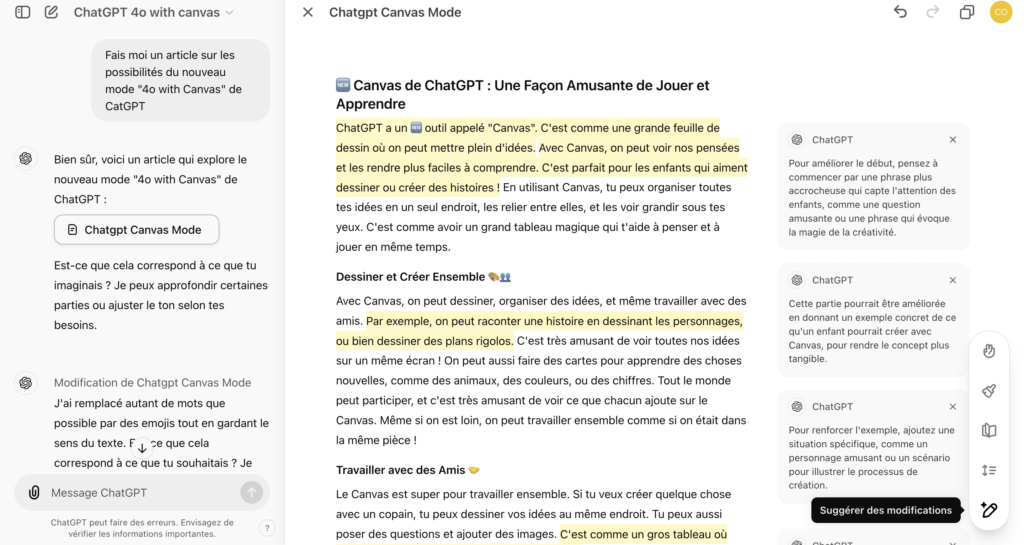
Introducing the Canvas Mode Interface
The Canvas mode interface is divided into two parts:
- Left side: It shows the initial query and ChatGPT's brief response, confirming that the requested content has been produced. This result is then displayed on the right side.
- Right side: This is where detailed explanations and editable content appear. You can edit the text as you like, as if you were using a word processor like Word. By highlighting a part of the text, a small context menu appears, allowing you to change the text's appearance (bold, italic, heading) or make a new request via the "Ask ChatGPT" button.
Canvas mode also offers additional options:
- Add emojis: By pressing the corresponding button, the text is analyzed to display relevant emojis.
- Choose reading level: You can adapt the text's reading level, from kindergarten to higher education.
- Change text length: An option allows you to make the text longer or shorter, depending on your needs.
- Refine: To automatically improve text quality.
- Suggest edits: This function highlights parts of the text with improvement suggestions.
Finally, a "COPY" button is available at the top of the screen to easily retrieve the edited text.
Canvas mode is a real game-changer for content creators, marketers, and professionals seeking efficiency. No more juggling between ChatGPT and other tools—everything is integrated to streamline your writing process and make your responses as precise as possible.
A little discovery while writing this article: if you make prompts to complete a document's content, the new part produced will be added to what's already been done!
Moreover, we will now have access to the classic conversation mode, where a Canvas button will allow you to find this editing space.
An Interface That Will Delight Many!
Canvas mode is a real game-changer for many professionals:
- Writers: Whether for marketing, content production, writing web articles, or social media posts, Canvas mode allows you to create and refine texts with ease.
- Human resources: For creating announcements, internal documents, or any other type of communication.
- Legal professionals: Ideal for drafting contracts or conducting legal analyses, with the ability to precisely edit each part.
- Developers: Canvas mode allows code to be displayed clearly, with editable syntax highlighting. Developers can also give precise instructions on the left side to assist with debugging.
No more juggling between ChatGPT and other tools—everything is integrated to streamline your writing process and make your responses as precise as possible.
Verdict
Canvas mode is very well thought out and extremely practical. Once the content is modified, all that's left is to copy and paste the result into an email, a Word document, or any other desired format. It's an ideal solution for those who have been waiting to be able to adjust responses directly in ChatGPT before integrating them elsewhere. With this feature, ChatGPT is gradually establishing itself as a comprehensive editing tool.
However, there are a few downsides: the Canvas interface does not yet allow collaborative sharing, which would have been a very interesting feature for team editing. Additionally, sometimes the interface doesn't launch correctly, even when in Canvas mode, which is odd.
Despite these minor drawbacks, Canvas mode is an excellent reason to subscribe to the paid plan before this feature is, perhaps, shared with everyone for free later on.